Google Adsense Tips & Tricks
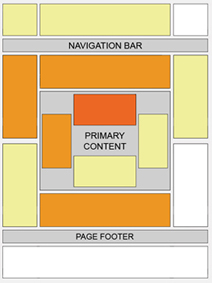
1. Google's Heat Map really does work and deserves the full attention of those who've ignored it. It's really helped to improve the Click Thru Rate (CTR). https://www.google.com/support/adsense/bin/static.py?page=tips.html&gsessionid=valuer
2. When it comes to content, spared some time to write the best article you can. Don't write a bunch of rehashed garbage that's already been copied 100x before by lazier webmasters then you. Write something fresh and recent with new sources. Also, don't make the article short just because you don't like to write. Write until you've exhausted the subject. This will help you avoid duplicate content penalties, increase the "stickiness" to your site, and put out more 3,4,5, etc. keyword combinations that you can pick up traffic on.
3. Match your ad style to your page style sheet. You will see big jumps in the CTR by doing this.
4. The traffic sources can impact the CTR. If there are bringing generic, run of network traffic to your site, you will have lower CTR. If you bring targeted traffic focused on your topic to your site, you will see higher CTR.
5. Use an adlink in addition to an adblock, and consider placing it at the end of your page's text. If the text you've written is sufficiently focused on your keywords, the adlink should have no problem with relevancy. The adlinks really work great and seem to add significantly in many cases to the bottomline. They sometimes subtract from the number of clicks you'd receive from a single adblock, but the dollar amount earned at the end of the day can be greater.
6. When placing adblocks, consider choosing alternating color schemes so repeat visitors to certain pages will see a different ad appearance on repeat visits. this might help alleviate ad blindness.
7. Regular updating of your website with fresh and original content.
8. Regular website promotion and search engine submission.
9. Keyword is important since search engines use this information to categorize a site's theme, and to determine which terms this site is relevant to -- the perfect keyword will help archive higher search engine positions. Keyword needs to be balanced correctly (too low and you will not get the optimum benefit, too high and your page might get flagged for 'keyword-spamming').
10. Find Link Partners. We found out that exchanging links with other web site owners is a MUST if you want to improve your search engine rankings. Google especially will consider your site more relevant if your site has other sites linking to it. Also the ad copy from other sites, if relevant, can add more valuable keyword content to your own site.
source:http://adsense.ae18.com/
notes:
don't agree with this post can claim at:mymuse88@yahoo.com
Google Adsense Tips & Tricks
Adsense Tips in Blogging
When I first made a “real website” by buying my own domain (Blogging the Internet), I started to tinker with various content management programs to build my site, and later learned that blogging is the easiest way. Now I’m sticking to it. But at first I was one of the million newbie webmasters who are lured to the “get rich quick” paranoia” that abound in the internet and also tried my best looking for internet programs that will take me to that paranoia.
I was utilizing various pre-hosted sites (my favorite is Freehostia in doing the test-and-try website building trying to find my own niche on the cyberspace and the same time hoping that I will earn somehow through it.
I joined pay per click programs (PPC) where you click banner and text ads and then pay you cents and worse joined a High-Yield Investment Program (HYIP) and was cheated. I lost a couple of dollars joining the site and I swear to myself that I will not join one again.
My frustration is getting worse when I also joined affiliate programs such as Commission Junction, Linkshare and SFI and expected to earn but to avail. These site as good in their own way but my skills in affiliate marketing is very poor and my highest earnings was about $20.40 from CJ when I used my own affiliate link to purchase my own domain.
I share some dilemma with people who say that “internet income is just a false dream”.
I am not a risk-taker especially on the internet. The last thing that I will want myself is to be a victim of internet fraud and loss my hard-earned money and like most cybercitizens I want money and if possible free from the internet.
Then I meet the leader of contextual advertising – AdSense.
AdSense program is 100% free and I have applied to it the moment I wonder why most sites I have visit has that ads powered by AdSense. I applied four times, three times rejected and finally allowed to post ads to my sites using their script code. It took me quite awhile to be able to put AdSense ads in my site considering that I am still learning how to make a site and my knowledge about PHP and HTML is limited.
Since I decided to focus on having a blog, I tried to invest an ad placement on my blog placement, having that trial and error process on making a good and professional looking blog and took a longer time finding a suitable Adsense Friendly template
https://blogger.googleusercontent.com/img/b/R29vZ2xl/AVvXsEjS8trqHVK39Swii3xo4Zp6OPexZCYKyou-jY4wtKvRhB0NlCPuORpyxKjUWLV2x-nj4v1Iwlt89F92NKBM5ZFCJYACrKQDBQZHsz2qREi8LD6lA0Pfu4_QeWk1NogKH9QhmTSu6iDXWuw/s1600/adsense3.gif
Adsense, like any other contextual advertising program uses your blog content and keywords to place related and suitable ads on your site in a way not to confuse your readers of what is your site all about and irritated for placing blatant advertising banners. The ads put by Adsense have a better chance to be click and earn money from it.
Though Adsense doesn’t allow you to select what ads will appear in your site, you can still exclude ads from your direct competitors (sites that have the same topic or products that you have).
How Adsense know what Ads are to place in your site?
Google uses bots (Google bots), an engine that regularly visits your pages and read your site content, keywords, structure and formatting of pages, language you use and tell Adsense to display ads related to what it sees. The bot also tells AdSense what IP address you use (your location) to display related ads near your region.
The longer that your site is up, the more the bot will access your site and later a tighter match f ads related to your blog will show up. Google bot mostly uses keywords as its tip to Google, so there is a need to use proper keywords on your post because for some reason Adsense prefers post with less picture and larger or bold text in zeroing the subject of your blog.
However, be careful in suing too many keywords. You may make Google Bot understands more quickly your site content but at the same time distracts your readers. A good post that is informative will surely attract readers and make them come back to your site, but you will, but using irrelevant and annoying keywords will drive them away from your site and instead look for other blog that is more useful to your read. Losing a visitor will also results to loss of your Adsense earnings.
Treat your readers by giving them useful information, and not to make them feel that you are just using your blog to make money. There’s nothing wrong in pleasing Googlebot and your readers at the same time. Why not hit the two birds with one big stone?
It will be a great help that your keyword is also your title and use them on your post as well. Ex. You write about computers, make sure it is in the title and repeated in the post so that tightly match of ads will also show thus having a high click through rate from your readers.
Try not to copy content from free sites. You will not only lose your credibility as a blogger, worse risking to be accuse of plagiarism and also getting Google irritated with splogs (short for spam blogs) post. Splogs is very dangerous because it may results to the termination of your account.
Anyway who advertise to your blogs?
Google has a program called Adwords, where business or site owners like you pay to advertise their product and services and also to drive real traffic to their websites.
These guys are bidding on a certain keywords related to their site content and pays some amount depending on the keywords popularity. They post their ads on Adwords and then it is being shown in Adsense.
Google Adsense Tools
At Valuer.com.my, we are constantly looking for free and commercial tools that will assist you to create value from Google Adsense business. This section will be updated on regular basis. Do bookmark this page and check back periodically for latest tools information available.
If you have created a tool suitable for Adsense users, and would like to have it featured here, please email us, we will review accordingly and suggest to publishers.
Adsense Revenue Checker
Revenue Checker for AdSense is a totally secure real time Google AdSense monitoring and tracking solution.
Revenue Checker is allowing Google AdSense publishers to check their AdSense revenue and detailed statistics in either specific time intervals or manually with single click option.
Revenue Checker creates numeric, as well as graphic output to all statistics, including channels.
Price : $49.99 USD
Rating : 3 out of 5 possible stars
Golden Keywords
Every search engine optimization begins with keyword research. Golden Keywords will help you find best keywords for your web site fast and accurately. Features fast exhaustive keyword research, perfect keyword identification and easy-to-use interface for ranking found keywords.
Price : $49.95 USD
Rating : Not Rated
Keywood Density Tools
The keyword density tool is useful for helping webmasters achieve their optimum keyword density for a set of key terms/keywords.This tool will analyze your chosen URL and return a table of keyword density values for one, two, or three word key terms. In an attempt to mimic the function of search engines spiders, it will filter out common stop words (since these will likely be equally ignored by search engines), it will avoid filtering out stop words in the middle of a term (for example: 'designing with CSS' would get through, even though 'with' is a stop-word).
Price : Free to use online or can placed in your website.
Check the list to learn more about keyword density tool.
http://www.seochat.com/seo-tools/keyword-density
source:http://adsense.ae18.com/
notes:
don't agree with this post can claim at:mymuse88@yahoo.com
Label: Adsense Tools
The Way Google Detects Invalid Clicks
A lot of Google AdSense publishers are banned from the Google AdSense program for invalid clicks. Some of these Google AdSense publishers manage to get their AdSense account reinstated. However, majority of them failed to do so. As a result, they are banned from the Google AdSense program.
Google does not reveal any specific details about invalid clicks in order to protect their proprietary clicks fraud detection technology. Hence, you would not know who is generating these clicks on your site or where these clicks come from.
If you are not getting any details of the invalid clicks from the termination letter, it may be a good idea to learn how Google defines these clicks and ways to detect them.
Google defines invalid clicks as:
• Manual clicks intended to increase publisher’s advertising
• Clicks by automated tools, robots, or other deceptive software.
So how does Google detect these clicks and how would they know which clicks are invalid? Google AdSense team uses three powerful tools to detect invalid clicks:
• Detection and Filtering Tool: Each click on an AdSense ad is monitored by Google system. Google will record the IP of each click, the time of the click, duplicate clicks and various click patterns. Google will use these factors and filter out potential invalid clicks.
• Advanced Monitoring Tool: Google uses its proprietary software to monitor clicks fraud activity. They are constantly working to improve their technology.
• The Google Team: In addition, Google has a team that uses specialized tools and techniques to examine individual case of clicks fraud. When Google system detects potentially invalid clicks, a member of this team will examines the affected account.
Despite the effort that Google put in to improve their clicks fraud detection technology, there are few innocent publishers whose AdSense account has been suspended or banned temporarily for different reasons. For example, a sudden spike in your AdSense earnings would probably raise the red flag in their system and cause your AdSense account to be suspended. If your AdSense account is suspended for invalid clicks which you did not commit, Google provides you a way to make your appeal:
http://www.google.com/support/adsense/bin/request.py?contact=invalid_clicks_appeal
A Piece of Advice
When you are making your appeal via email, you should stay calm and plan the right strategy. You should be patient when dealing with Google and most importantly you should be polite when communicating with them. You may take initiative to provide them with all the documents they need.
Google AdSense Tips Tricks Secrets
The list of Google google adsense Tips and tricks shown below give you some ideas on how you can optimize your google adsense site and boost your google adsense income.
google adsense Tip #1 - Choose A Right Topic
The first google adsense secret to a successful google adsense business is choosing the right topic for your site. You can decide a topic or theme for your google adsense site using this approach or you can start your google adsense site with a topic that you have passion for. Among the few things that you have passion for, you should start with the most popular topic and create contents targeting on the popular keywords.
google adsense Tip #2 - Choose the Right Domain
Getting a right domain name for your google adsense business is the second google adsense secret. A right domain name may give your site better ranking in SERP. You can include keywords in your domain. For example, if you are running an online business directory, it is a good idea to include ‘directory’ as part of your domain name. Thus, your domain name will be called online-directory or businessdirectory.
google adsense Tip #3 - Research the Keywords
The most important google adsense secret is keyword research. With a list of keywords or key phrases, you would be able to understand what Internet users are looking for when they do a search on your topic and what keywords they use for the search. With this list, you would be able to know which keywords are the most popular and the most competitive. You will have a clearer picture of your target market with the help of this list. Learn more about how to research your google adsense keywords here.
Once you’ve decided a list of keywords to start with, you should focus on them as you build the contents. You should use targeted keywords frequently but naturally.
google adsense Tip #4 - Quality and Unique Content
Most people use search engine to look for information that may solve their problems. Your google adsense site provides them with the possible solution to their problems. Quality and unique content are the google adsense Secret that makes your visitors coming back for more.
Search engines are trying to provide quality and yet relevant information to Internet users for their searches. Search engine spiders crawl the Internet looking for quality content. Keywords in your content helps the search engine spiders to determine how relevant your content is to these searches. The keyword rich content should rank higher in search engine result page.
Creating quality and unique content for you site is not as hard as you think, you can find easy way to get quality contents for your google adsense site here.
google adsense Tip #5 - The Placement of Your google adsense Ads
This google adsense Secret will reward you with high click through rate - right placement of your google adsense Ads. So, where should you place Google google adsense ads on your content pages?
Review this article for more details click here.....
source:http://www.moneyany.com/
click here if want to visit this link
The best locations adsense
The best location for Google adsense varies from page to page, depending on content. Here are a few questions to ask yourself when considering where to position your ads:
* What is the user trying to accomplish by visiting my site?
* What do they do when viewing a particular page?
* Where is their attention likely to be focused?
* How can I integrate ads into this area without getting in the users' way?
* How can I keep the page looking clean, uncluttered and inviting?
Certain locations tend to be more successful than others. This "heat map" illustrates the ideal placing on a sample page layout. The colours fade from dark orange (strongest performance) to light yellow (weakest performance). All other things being equal, ads located above the fold tend to perform better than those below the fold. Ads placed near rich content and navigational aids usually do well because users are focused on those areas of a page.
While this heat map is useful as a positioning guideline, we strongly recommend putting your users first when deciding on ad location. Think about their behaviour on different pages and what will be most useful and visible to them. You will find that the most optimal ad position is not always what you expect on certain pages.
For example, on pages where users are typically focused on reading an article, ads placed directly below the end of the editorial content tend to perform very well. It is almost as if users finish reading and ask themselves, "What can I do next?" Precisely-targeted ads can answer that question for them.
source:https://www.google.com/adsense/support/bin/answer.py?answer=17954
click here for visit this link
Adsense Tools Secrets
++google adsense Script Tools
These are the tiny little programs you install on your server (blech!) or locally on your machine that help you analyze your google adsense clicks, CTR and earnings. Some of them are easy, some of them are difficult, and some of them help you make pretty graphs. To be honest none of them are worth recommending. You could do just as good a job by setting up your channels properly and dumping a CSV file into excel. If someone has a specific one or wants to send me a review copy of thier software, I will look at it. DO NOT send me anything that has to be installed on a server. I run multiple websites on multiple hosting companies, so I don’t need something that requires more maintenance thank you very much.
++google adsense Preview Tools
The google adsense Sandbox comes via Digital Point. You put in a URL and it lets you preview what ads are most likely to appear on a URL. Pretty handy IMHO.
++google adsense Tracking
While not set up to be an google adsense
tracking tool per se, the free log analyzer from AddFreeStats is actually pretty good. You put a small graphic tracking bug on the bottom of each of your pages and it gives you standard logging reports. You can also activate google adsense tracking to find out what ads are being clicked on what pages. Combine this with an excel spreadsheet and channels and you are good to go. You can upgrade to a paid version and get an invisible tracking bug. TIP: Lock down your stats under a password, I’m fascinated how many people leave that open.
++google adsense in Action
Probably one of the best things you can do to increase your google adsense earnings is to go and look how other people are doing things. The google adsense case studies are one place. While these are Google approved you really don’t have an idea how successful they are. So you’d be much better off finding someone you know is in the UPS Club. Jason Calacanis who runs Weblogs Inc is on a quest to make 1 Million dollars a year from google adsense. While I do give Jason a hard time sometimes, I do actually admire what he’s built, and think there are some very valuable lessons to be learned from looking at the websites owns. Darren Rowse of ProBlogger also has two sites I really like the Digital Camera Review and Camera Phone Review. Don’t be a wanker and copy exactly what they’ve done, it’s bad form. Instead look at them, learn from them, and use it as inspiration.
Label: Adsense Tools
Google Adsense Tips, Tricks, and Secrets
I’ve been reading a few forums and blogs about google adsense tips lately, and thought it would be helpful to consolidate as many as possible in one place without the comments. I’ve also thrown in a few tips of my own. We start out with some of the basic general stuff and move to the more specific topics later on.
Build an Empire?
When you’re deciding to become a website publisher you will fall into one of two broad categories:
• Publish 100 websites that each earn $1 a day profit
• Publish 1 website that earns $100 a day profit
The reality of it is, most people end up somewhere in between. Having 100 websites leaves you with maintenance, management and content issues. Having one website leaves you open to all sort of fluctuations (search engines algorithm’s, market trends, etc). You can adapt your plan on the way, but you’ll have an easier time if you start out going in the direction of where you want to end up.
General or Niche
You can build your website around general topics or niche ones. Generally speaking niche websites work better with google adsense. First off the ad targeting is much better. Secondly as you have a narrow focus your writing naturally becomes more expert in nature. Hopefully this makes you more authority in your field.
If this is your first try at building an google adsense website, make it about something you enjoy. It will make the process much easier and less painful to accomplish. You should however make sure that your topic has enough of an ad inventory and the payout is at a level you are comfortable with. You may love medieval folk dancing, but the pool of advertisers for that subject is very small (in fact it’s currently zero).
Once you’ve gotten the hang of how google adsense works on a website, you are going to want to dabble in some high paying keywords, you may even be tempted to buy a high paying keyword list. This does come with some dangers. First off the level of fraud is much higher on the big money terms. Secondly there is a distortion of the supply and demand relationship for these terms. Everyone wants ads on their website that make $35 or more a click, however the number of advertisers who are willing to pay that much is pretty limited. Additionally the competition for that traffic is going to be stiff. So, don’t try to run with the big dogs if you can’t keep up. If you have to ask if you’re a big dog, then chances are, you’re not. I have used a high dollar keywords report from cashkeywords.com and was pleased with my results (see cash keywords free offer recap).
New Sites, Files and Maintenance
When you’re building a new site don’t put google adsense on it until it’s finished. In fact I’d go even farther and say don’t put google adsense on it until you have built inbound links and started getting traffic. If you put up a website with “lorem ipsum” dummy or placeholder text, your google adsense ads will almost certainly be off topic. This is often true for new files on existing websites, especially if the topic is new or different. It may take days or weeks for google’s media bot to come back to your page and get the ads properly targeted. TIP: If you start getting lots of traffic from a variety of IP’s you will speed this process up dramatically.
I like to build my sites using include files. I put the header, footer and navigation in common files. It makes it much easier to maintain and manage. I also like to put my google adsense code in include files. If I want/need to change my google adsense code, it’s only one file I have to work with. TIP: I also use programming to turn the google adsense on or off. I can change one global variable to true or false and my google adsense ads will appear or disappear.
Managing URL’s and channels
google adsense channels is one area where it’s really easy to go overboard with stats. You can set up URL channels to compare how one website is doing to another. You can also set up sub channels for each URL. If you wanted to you do something channels like this:
• domain1.com - 728 banner
• domain1.com - 336 block
• domain1.com - text link
• domain2.com - 728 banner
• domain2.com - image banner
• domain2.com - 336 block
• domain3.com - 300 block
While this is great for testing and knowing who clicks where and why, it makes your reporting a little wonky. Your total number will always be correct but when you look at your reports with a channel break down things will get displayed multiple times and not add up to correct total. Makes things pretty confusing, so decide if you really need/want that level of reporting detail. TIP: At the very least you want to know what URL is generating the income so be sure to enter distinct URL channels.
source : http://www.wolf-howl.com/22/google-adsense-tips-tricks-and-secrets/ or click here if you are wanna to visit google adsense tips trick and secretsclick here if you are wanna to visit this link
Adsense Tips, Layout Optimization Tricks for Higher CTR
Google Adsense is perhaps the easiest way to attract advertisers from across the globe to your blog. Just submit your blog to Google for approval. If Google likes what it sees, it will place contextual ads linking to products likely to appeal to the readers. Each time a reader clicks a link, the advertiser pays Google a small fee, and Google splits that with you.
The next interesting question - How to Make Money with Google Adsense ? Here are The best Google Adsense Tips and Tricks for making more money (profit) from Google adsense program.
a. Strictly follow the rules mentioned in Adsense policies. You will always earn more revenue from Adsense by playing it clean.
b. Never modify the Google Adsense HTML code.
source by :http://labnol.blogspot.com let visit this link if you want.
c. Don't ask your friends or visitors to click on your Google ads. Do not include incentives of any kind for users to click on ads. Don't label the Google ads with text other than "sponsored links" or "advertisements.".
d. Don't click on your own ads - Google is much smarter than you think. You should not reload your pages excessively. If you are testing your website layout with Google adsense, follow some precautions. Or you can use the unofficial Google Adsense Sandbox Tool that is accessible from Firefox, IE and other browsers to see what kind of Google ads will be served based on content (website address URL) or keywords.
e. Don't place ads in pop-up windows, error pages or even empty pages.
f. Don't start a "adsense asbestos" or "home equity loan rates" website merely to make money from accidental clicks (accidence). You will never make money out these "made-for-adsense-only" websites. Instead, write on topics what you are passionate about. Don't waste your money on high-paying adsense keywords lists.
g. For short articles, CTR is best when ads are placed just above the content
h. For long articles, CTR improves if ads are placed somewhere in middle of the content - visitors read the long content and then they are looking for more resources.
i. Use Text Ads instead of Image Ads as users get more options. If you still want to display image ads, consider ad formats that support image ads - Choose either the 300x250 medium rectangle or the 160x600 wide skyscraper - or both, if you display multiple ad units on a page.
j. Google Ads without background color and borders always perform better. Make the border color and background color same as your page background color.
k. Always put ads above the main fold. Make sure that the ad unit with the highest clickthrough rate is the first instance of the ad code that appears in the HTML. Since the first ad unit is always filled before the rest, you want to make sure that ad unit is located in the best placement on your page.
l. Try setting the ad link URL color to a lighter shade. If your text is black, you may make the adlink as light gray.
m. Go Wide - The large rectangle is the best paying adsense format (336x280) - The Google Adsense Publisher team also feels that the best formats are the wider ones - the ad formats that contain the widest individual ads. Try using the 336x280 large rectangle, 300x250 medium rectangle, or 160x600 wide skyscraper.
n. Placing images next to ads or above ads does help in attracting user attention.
o. Blend AdLinks with other navigation links or place horizontal adlinks at the top of your webpage. AdSense publishers are permitted to click on link unit topics on their web pages, provided that they do not click on any Google ads on the resulting page.
p. Organize an Adsense Party for your friends and colleagues - Request them to navigate your website, watch their activity - it will provide vital clues about which regions on your website draw more user attention. Try putting ads near those areas. (Thanks Darren)
q. You can put upto 3 adsense units on a page. Try putting a large skyscraper on the right navigation sidebar of your website. That area is close to the browser scrollbar. You can also add 2 AdSense for search boxes, 1 adlink unit and 1 referral button per product (i.e., 1 AdSense referral button and 1 Firefox plus Google Toolbar referral button).
r. The first few lines of your content are an important factor for determining what Ads are served on your webpage. That's the right place to put keywords in bold (strong or |b| tags) or header tags (h1, h2, etc).
s. Always select the setting to open Google Adsense search box results in a new browser window, so you won't lose your visitors. Click the Open search results in a new browser window checkbox and this add target="google_window" to your form tag.
t. Maximum people think the search box is on the top right corner. So you know where to put it.
u. Don't syndicate full content. If people can read everything from the newsreader window itself, why would they visit your website where your ads are.
v. Use URL channels to determine performance of individual pages. I track my most popular pages with Google Analytics, Statcounter and create a channel for each of the URL. You can even track Adsense Clicks with Analytics
w. For low CTR pages, try changing titles or adding more content to get better focused ads
x. Block low paying advertisers with Filters. Why to loose a visitor for 0.01 cents. Use Overture or Google Adwords Keywords tool to discover keywords that are less popular with advertisers.
y. The AdSense for search Top Queries report shows you what your users are looking for, by listing the 25 most common searches conducted through your AdSense for search boxes. Use this report to identify additional topics to add to your site, or to keep track of your most sought-after information. Focus and improve that content.
z. Not everyone has a RSS reader. Use RSS to Email services like FeedBlitz, Bloglet or Rmail to let users subscribe to your blog by email.
Remember, you are the best judge when it comes to choosing ad formats. Even Google doesn't offer the best advise always. For instance, in the visual heat map, Google suggests that webmasters are best served by positioning ads on the upper left-hand side of a Web page. But on the Google homepage, you will find ads on the far right.
Getting paid through AdSense
Getting paid through AdSense program
Once you have setup your AdSense account and updated your website with AdSense code, you would surely be looking forward to earning some revenue from the AdSense Ads. Though revenue will start accruing to your AdSense account almost immediately, the actual payments to you are based on certain rules that Google has laid out for all website owners that have an AdSense account.
1. The first and the most important rule is that Google will make a payment to you only when your account balance is $100 or more. Also, these payments are made by Google within 30 days of the last day of calendar month during which you attain an account balance of $100 or more. If your account balance is less than $100 on the last day of the month, the balance just rolls over to the next month and this continues till you actually have at least $100 in your account. You can easily check your account balance by logging-in into your AdSense account.
2. Obviously, Google will only be able to pay you only if you provide them with the information that is required for payments. This includes the Payee information and contact details that you specified at the time of signing-up for an AdSense account. Though you can edit most of this information, country and Payee name cannot be changed at this stage (i.e. after the account has been approved by Google). If you need to get these changed, you will have to close your AdSense account and open a new one.
3. You will also need to submit your tax information using the Tax information link on the My Account tab. This information is required irrespective of your location and, in any case, Google would not process your payment without the tax information.
4. You also need to specify the mode of payment. This can be done through the ‘Payment Information’ link on the ‘My Account’ tab. Just check the options available for your location and choose the one that best suits you.
5. As soon as your AdSense account balance reaches $50, Google will mail (snail mail) a PIN number to your payment address. You will need to enter this PIN into your account before you can become eligible for payments from Google.
Getting Maximum Google AdSense
Getting the Maximum out of Google AdSense: Strategy Classification
Google AdSense program has given an altogether new purpose to websites. Besides serving content or selling products and services, websites are now being used to generate revenue through serving Google AdSense Ads. The webmasters employ various strategies in order to extract the maximum out of Google AdSense program. There is no formal classification available for these strategies (nor can all the strategies be determined), however, the following 3 classifications are said to be more prevalent than the others:
1. Traffic Generation: Since the revenue generation from Google AdSense Ads is based on the CPC (cost-per-click) and CPM (cost per thousand impressions) basis, the more traffic your have to your website the better are your chances of getting good revenue through AdSense. Most webmasters are fully aware of this fact and employ various tricks to generate high traffic to their website. All such tricks fall under the category of ‘Traffic Generation’.
2. Converting traffic to Clicks: Clicks seem to be the best way of increasing AdSense revenue. Prompting the website visitors to click on the AdSense Ads can make a big difference in terms of the AdSense revenue that you earn. A good copy can make the website visitors more confident about your website and hence encourage them to go ahead click the AdSense Ads. Besides the website copy, the website owners apply several other means for getting more clicks. These form the ‘Converting traffic to Clicks’ category.
3. Attracting High Value AdSense Ads: Besides the traffic to your website, your AdSense revenue is also based on the value of the AdSense Ads. So, some Ads produce more revenue when they are clicked/displayed than the others. This is determined using the Adwords system. Some webmasters develop websites primarily for AdSense revenue generation. These webmasters choose the website topic and orient the content in such a way so as to attract high value AdSense Ads. These tricks form the “Attracting High Value AdSense Ads” category.
Google Adsense filtering mechanism
Google’s Ad filtering mechanism.
Google’s filtering mechanism for Ads is based on a number of factors. Let’s take a look at some of these factors:
1. Relevance to content: This is the single most important Ad filtering criterion that is used by the Google AdSense program. In fact, it is this filtering concept that gives Google AdSense program an important edge over the other advertising programs. The Google AdSense program determines the main topics/subjects of the website content and serves the Ads that are relevant to the same. Since Google AdSense is a global program, the relevance of Ads is also checked with respect to geography and the language of the content on the website. Note that AdSense can actually be used in a number of languages not just English.
2. Appropriateness of content: Websites are based on varying themes. There are websites that are based strictly on Adult themes while the other sites are family friendly ones. Since Google’s AdSense program is open to all website owners and advertisers (who comply with the AdSense program policy), Google also controls the content of Ads to prevent Offense to anyone who sees the Ads. Google does this by using sensitive language filters and language experts. Google uses strict rules and guidelines for conducting an editorial review on the content of Ads. It also asks you to provide information about what kind of Ads (e.g. sexually-oriented, war oriented etc) you deem as inappropriate for your website.
3. Competition filter: Since Google serves Ads based on the content of the websites, it’s quite possible that the Ads of competitors get displayed on a website that sells a particular product or service. To avoid this, Google provides a facility to the website owners wherein they can specify competitors or advertisers whose Ads should not be displayed on the website.
4. Choose your own: You can also choose default Ads to be shown in case Google AdSense program is not able to serve Ads to your website (due to unavailability of suitable Ads, etc)
Misuse of Google AdSense
Google AdSense advertising system stands like a star among the other advertising system. The popularity of Google AdSense program can be judged from the fact that most websites today serve Google AdSense Ads. In fact, some of the websites are just so full of Google AdSense Ads that the rest of the content on the website is much dwarfed. These are the websites that are especially targeted at earning revenue through Google AdSense system.
Some website owners use wrong/ illegal tactics in order to increase their revenue from Google AdSense program. One example of misuse of Google AdSense program is websites that do not contain any useful information but, instead, have a lot of keyword based content that is targeted at fooling the search engines. Such websites are categorized as “AdSense Farms”. Sometimes website owners might use a large number of websites in order to create even bigger “AdSense Farms” that have completely useless content. However, this might lead to disqualification from the Google AdSense program. Another misuse of Google AdSense program is seen in the use of free content e.g. content from Wikipedia to attract traffic to the website. Google is always on the lookout for such websites and they keep upgrading their technology in order to bypass such websites. So, never use such methods that can get you barred from Google AdSense program. And remember, it’s difficult to outsmart Google on this front.
There are sufficient tricks and legal tactics available for getting more traffic to your website and for increasing the earning potential from your website. Use those tricks and track the performance of your websites in order to increase your revenues.
Tips for getting the best results your AdSense
Top 4 Tips for getting the best results from your AdSense Ads
The revenue that you earn from Google AdSense program is totally dependent on you and your abilities. Here are some tips that you can use to get the best results from your AdSense Ads:
1. Use channels: Channels help you in conducting a better analysis of the performance of your AdSense Ads. You can use custom channels to check what web pages are making more revenue and which ones are not doing so well. In fact, custom channels can be used for conducting analysis on multiple aspects at the same time. You can use this analysis for making amendments to your AdSense Ads or website content in order to get better results.
2. Ad customization and positioning: Shape, Size and color are the three properties of your AdSense Ads that you can easily control and customize in a way that the Ads don’t look out of place when served on your website. You can either make your Ads stand-out from the rest of the content on your webpage or you can make them blend with the overall webpage. Moreover, you can identify the hot spots on your website and position your Ads accordingly. Ad customization and Ad positioning are, in fact, the best ways to attract more clicks to your AdSense Ads.
3. Content quality: ‘The best generally overcomes the rest’ – is a very true saying. If you host quality content on your website and provide regular updates to your visitors, you can expect more traffic to your website. This will in turn lead to more ad impressions and possibly more clicks.
4. Use AdSense Ads on all pages: If you have multiple web pages on your website, you should include AdSense Ads on all of them. Since the visitors can enter your website through a number of different pages, having AdSense Ads on all the pages will surely increase your earnings.
Tips for AdSense for feeds
AdSense for feeds is currently in beta testing phase and the content publishers are just waiting for the flood gates to open in order to start earning revenue through the AdSense Ads in their feeds. Here are the top 3 tips that will help you fully capitalize on this revenue earning opportunity:
Content quality: You will earn Google AdSense revenue only if people subscribe to your feed. The more subscriptions you get, the better are your chances of success with AdSense for feeds. Since most people would be looking for quality content, you need to make sure that your feed contains up-to-date quality information that is presented to the users in an easy-to-understand language. Besides that, the feeds should be free from grammatical and spelling mistakes.
Content quantity: Include as much content in your feeds as you possibly can. Again, the aim is prove that the feed is useful and comprehensive (so that more users subscribe to it). If you feel that the complete article cannot go into the feed, include a good summary of the article.
Limit the ad units: If the users find that your feeds contain too much Ads, they might not subscribe to your feeds at all (and the whole purpose of feeds would get defeated). In order to ensure that you get good subscription to your feeds, you should limit the ad units to one per feed. Another good way of ensuring that your feeds don’t look like an advertising medium is to place the Ads either at the end of article or after having sufficiently discussed the topic.
So, get ready for enhancing your ‘AdSense for feeds’ revenue with these tips. Your wait may soon be over. Keep the tempo going and keep checking Google’s AdSense blog for updates about the launch of AdSense for feeds.
AdSense for feeds
Understanding AdSense for feeds
Google AdSense program offers more than one way of earning revenue from serving Google AdSense Ads. Though ‘AdSense for Feeds’ is one of the more recent ways of advertising using Google AdSense Ads, it’s in no way less effective than the others. Here, Google places the Ads of the advertisers in the relevant feed articles (again, note the most important characteristic of the Google AdSense program comes into play here too i.e. ‘relevant feed’ not just any feed).
The feeds are in the form of articles, headlines or summaries. These content formats allow the users to easily access the content from several publishers (content owners) at one place. This is achieved through feed aggregators like Bloglines etc. Again, Google uses its technology to determine what advertisements would be contextually suited for a particular feed. You get paid as the publisher of original content and hence make easy money. As for the readers, they as such get a rich experience because they can see the relevant advertisements with the content that they are interested in. Moreover, they can also choose the feeds that they want. Users can click the advertisements to visit the advertiser’s website and check if their products and/ or services are of any use to them. Of course, the Advertisers benefit too. They get targeted advertising which means only the really interested people get to know about their products and services (and hence there are more chances of a better conversion rate for sales).
So, the prime concept for ‘AdSense for feeds’ remains the same as the Google AdSense program; only the orientation changes a bit. But note that Google is currently beta testing ‘AdSense for feeds’. Beta test for the program quickly got fully subscribed, so Google is not accepting any more applications for AdSense for feeds.
It’s only a matter of time before Google AdSense for feeds hits the internet and opens another revenue earning opportunity for website owners.
Performance tracking ads reports
Performance tracking through reports
Google AdSense program provides you reports which you can use for tracking the performance of your AdSense Ads. There are certain basic reports which are as such available on all AdSense accounts. These reports will show you the total number of page impressions, ad unit impressions, ad clicks, cost per thousand impressions (effective CPM), click through rate (CTR), and your earnings of course. You can view the reports for the date range of your choice. However, do not expect the report to be updated every second. Typically, the data is updated by Google AdSense program after every hour.
You can customize these reports for advanced performance tracking. Though simple customization of basic reports is useful too, it’s the ‘channels’ that really help in conducting a detailed performance analysis. Using channels you can get data broken down and presented in a number of different ways e.g. you could compare the performance of one set of pages against another, you could compare the performance of one ad format against another etc. There are various options available with channels and it’s just a matter of exploring them and using them to your benefit.
Besides viewing the reports online, you can even download your reports (in CSV format – comma separated values format). If you don’t want to login to your AdSense account very frequently, you can set up email-able reports which automatically get emailed to you or whoever you designate.
AdSense for Search
An introduction to AdSense for Search
While talking about Google AdSense, we must not forget that Google is primarily known for its search engine capabilities (in fact, it is one of the most powerful search engines available today). So, how could Google leave out it search engine capabilities from its AdSense program?
‘AdSense for Search’ is how Google includes search engine bit into the Google AdSense program. ‘AdSense for Search’ can actually be termed as a sibling of Google AdSense program and is one great way of increasing website revenue for website owners. To implement ‘AdSense for search’, you just have to include the Google search box on your website. Again, Google offers the code that you need to use for including Google search box. You just have to paste the code at whatever place you deem as the most appropriate place for Google search box.
When your website visitors use Google search bar on your website, they get almost the same results as they would by using Google separately through Google.com. When these website visitors click the search results, the website owner earns revenue (CPC revenue). You can even include AdSense Ads on the search results page and earn CPM or CPC revenue from them. Also, you can customize the search results page to suit your website’s theme. So, Google AdSense for search is one great way of making money just by including the Google search bar on your website. Besides that, the visitors to your website get an additional functionality through your website i.e. the facility to search the web using one of the most powerful search engine (without leaving your website).
‘AdSense for search’ is a great way of earning revenue through your website (and, in fact, one of the easiest ways too). A number of website owner actually use both the ‘AdSense for Search’ and the regular ‘AdSense for content’ in order to maximize their revenue.
through Google AdSense program
Any website can become a bill-board through Google AdSense program
We all know that Google’s AdSense program is one of the most reputed internet advertising programs around. AdSense is one advertising program that brings a number of people (websites) into its fold as advertising media and hence helps them earn revenue (advertising revenue). These people are webmasters who own websites and it’s their websites that function as bill-boards and serve advertisements.
With Google AdSense program, any website can easily become a bill-board:
1. No experience necessary: Google AdSense program offers earning opportunity to every webmaster. The only criterion is that you should have a website (and your website should be compliant to the AdSense program policies). You don’t need to know anything about advertising or advertising media etc. Just enroll with the Google AdSense program and Google will take care of designing the Ads and serving the relevant Ads on your website. So, no special designing skills or coding skills are required for getting enrolled and using Google AdSense program.
2. No need to look for advertisers: When the commercial value of websites for advertising was recognized, webmasters started looking for increasing traffic to their websites in order to make their website worthy enough to attract advertisers. Even then, getting advertisers was not easy. So, they could not really derive any monetary benefits from the traffic to their website until an advertiser actually bought advertising space on their website. However, with Google AdSense program, webmasters start earning revenue from the day they join the Google AdSense program. As the traffic to their website increases, so does their revenue.
3. No need for tracking revenue: Google AdSense program will also take the responsibility of tracking the revenue that you earn from serving the Ads on your website. You can just login to your Google AdSense account and check your earnings. Moreover, you have various reports and statistics available to you that you can use for enhancing the performance of your website on the Google AdSense program.
So, Google AdSense program has really made it easy to convert a website into revenue earning medium.
AdSense tips
AdSense tips that you might have missed out on
Google AdSense program is one of the best online advertising programs that are in use today. AdSense program is beneficial to all the involved parties i.e. the advertisers, the website owners and the website visitors. The popularity of AdSense program seems to be the most among the second group i.e. website owners. A number of website owners today use AdSense Ads on their websites in order to earn good revenue on a regular basis. They use a number of tricks and tips in order to maximize their revenues.
Besides the regular tips, there are some other AdSense tips which a number of people miss out on unless they are very careful:
1. Use multiple ad units: Google allows you to use up to 3 ad units and one link unit per web page. Since your revenue earnings are dependent on ad clicks and ad impressions, a higher number of ad units can potentially increase your AdSense earnings. However, do not go with the maximum allowed ad units if you don’t have enough content on your web page; this might offend the website visitors.
2. Use wider Ad format: Though Ad formats yield different results for different websites, the wider Ad formats (like rectangles) are generally known to be more effective than their narrower counterparts (there is a scientific explanation for this, but we can leave that out since we are more concerned with the results).
3. Limit the filters: Filters are useful for blocking the Ads that you don’t want displayed on your website e.g. Ads of competitors. However, too many filters can seriously limit your revenue earning potential from AdSense Ads. So, limit the use of filters to minimum.